How to Request Credit
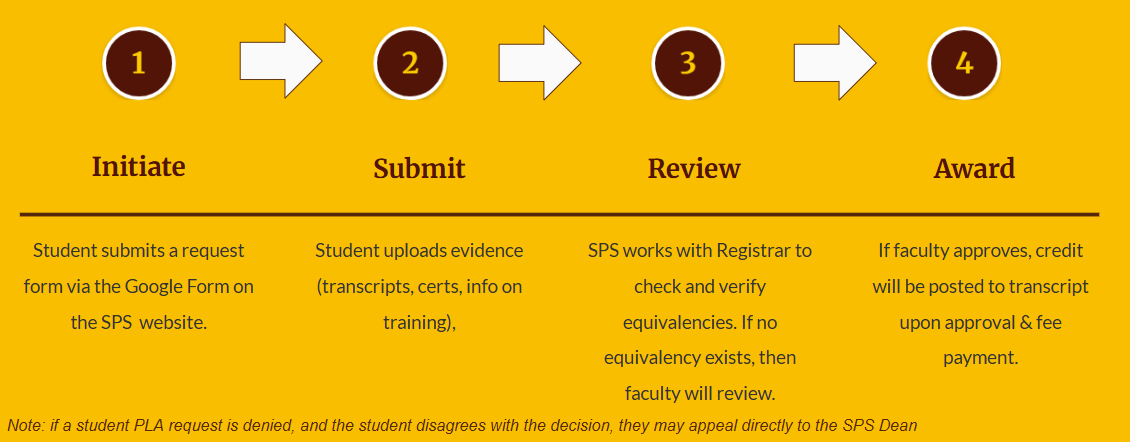
How to Request Credit
How to Request Credit for Learning Already Accomplished
- Identify What Rowan Course(s) You Would Like Credit For
To receive credit for the accomplishments and experience that you bring from beyond the classroom setting--certifications, transcripts, and volunteer experiences must be tied to Rowan courses and the learning outcomes with each one. (see the example below)
Rowan University may have already assessed the same certifications for other students. For a list of certifications that are already assessed for Rowan equivalency, you can access the PLA Transfer Course Database. (update to PLA specific database - through ticket)
If you don’t find the certification/experience that you have, you can find the full listing of courses and their descriptions at the Rowan University Catalog. Here you might be able to identify the Rowan course that best suits your accomplishments.
Example--Applying the OSHA 10 and OSHA 30 to the Construction Management course, CM 01411 Construction Safety and Loss Prevention
- Put a Compelling Case Together
You will have to tie your learning and experience to the Learning Outcomes of a Rowan course. Your case will be reviewed by University faculty to determine if it’s a match for that particular Rowan course. Note: the course that you request can not be a course that you have taken before.
The request and supporting documentation will be reviewed by the corresponding faculty (ex. Construction Management sent to CM Faculty at the College of Engineering). If the faculty determine that your sponsored professional training does substitute our course (s), you will be notified and the Registrar’s Office will apply the credit to your program of study.
- Submit Your Request in the Form
The request and supporting documentation will be reviewed by the corresponding faculty (ex. Construction Management sent to CM Faculty at the College of Engineering). If the faculty determine that your documented training does substitute our course(s), you will be notified and the Registrar’s Office will apply the credit to your program of study.
If credit is not granted, you will receive an update with a rationale from the faculty. A request for an appeal can be sent to pla@rowan.edu.
- What if my Training/Experience isn’t Documented Training?
You can still put together a portfolio and receive credit through the NJPLAN Portfolio Development course at Thomas Edison State University.
Students who complete the NJPLAN Portfolio Development and convert their experience/accomplishments into college credit can transfer that credit from Thomas Edison State University to Rowan University. Have official transcripts sent directly to electronic-transcripts@rowan.edu.Example
Students in our Computer Systems Technology program can get credit for CST 06320 Microcomputer Operating Systems I: Workstation if they attained the Microsoft Endpoint Administrator Certificate . This course has these learning objectives…
- Protect a windows workstation from malware and other security threats with the following tools, “Windows defender firewall, Windows defender applications Guard and many other protective software applications.
- Conduct and differentiate between various types of Windows installations.
- Setup Microsoft Windows Networking IPV4 and IPV6, wired and wirelessly.
- Point out System Access Methods using proper Authentication and Authorization.
These four learning outcomes are tied to that Microsoft Certification. Both the course and the Microsoft Endpoint Administrator Certificate cover deploying, configuring, securing, managing, and monitoring Windows client environments.